AnyMoCap / BVH_Xsens (AMMR): model runs if I only edit SubjectSpecificData, but any new .any file I include causes parser errors ('.' unexpected, '{' unexpected, 'AnyFolder' when 'Main' was expected)

Hello,

I am working with the AnyMoCap BVH_Xsens example in AMMR and I am running into a persistent parsing issue when trying to add any new AnyScript code.

Software:
AnyBody Modeling System 8.1.x (Faculty Research License)

Model:
AMMR → Application → MocapExamples → BVH_Xsens (AnyMoCap framework)

Goal:
I imported my own Xsens BVH file and can successfully run the full example pipeline (MarkerTracking and InverseDynamicStudy). However, I cannot add any additional AnyScript code via a new .any file, even a very simple test, without getting syntax/parser errors.

What works:

  1. I navigated to:
    C:\AnyBody\AMMR\Application\MocapExamples\BVH_Xsens
  2. I copied my BVH file into:
    BVH_Xsens\BVH-files
    The file is copied successfully.
  3. In the Subjects folder, I copied an existing subject/trial folder, renamed it to my subject identifier (for example: S_H\S_H_Trial01), and loaded Main.any from that folder.
  4. Initially, many files were read-only due to Windows permissions. I removed the read-only attribute at the AMMR folder level (right click → Properties → uncheck Read-only, apply to subfolders and files).
  5. I edited only SubjectSpecificData.any (for example, body mass and body height). After this change, the model loads and RunAnalysis works correctly.

So the baseline AnyMoCap example works, and editing the provided hook files works.

What does NOT work:

As soon as I try to add any new AnyScript code, the model fails during parsing.

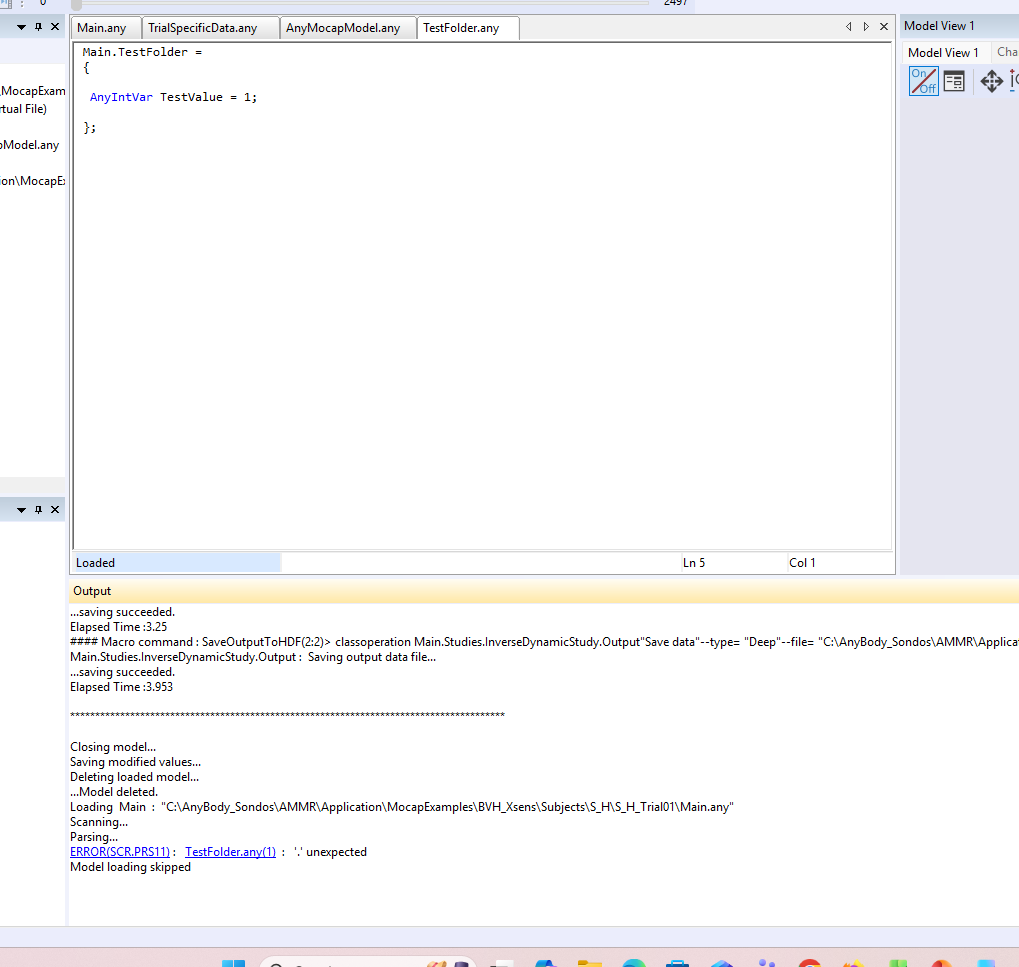
For example, I created a new file called TestFolder.any in the same directory as Main.any and added the following minimal content:

Main.TestFolder =
{
AnyIntVar TestValue = 1;
};

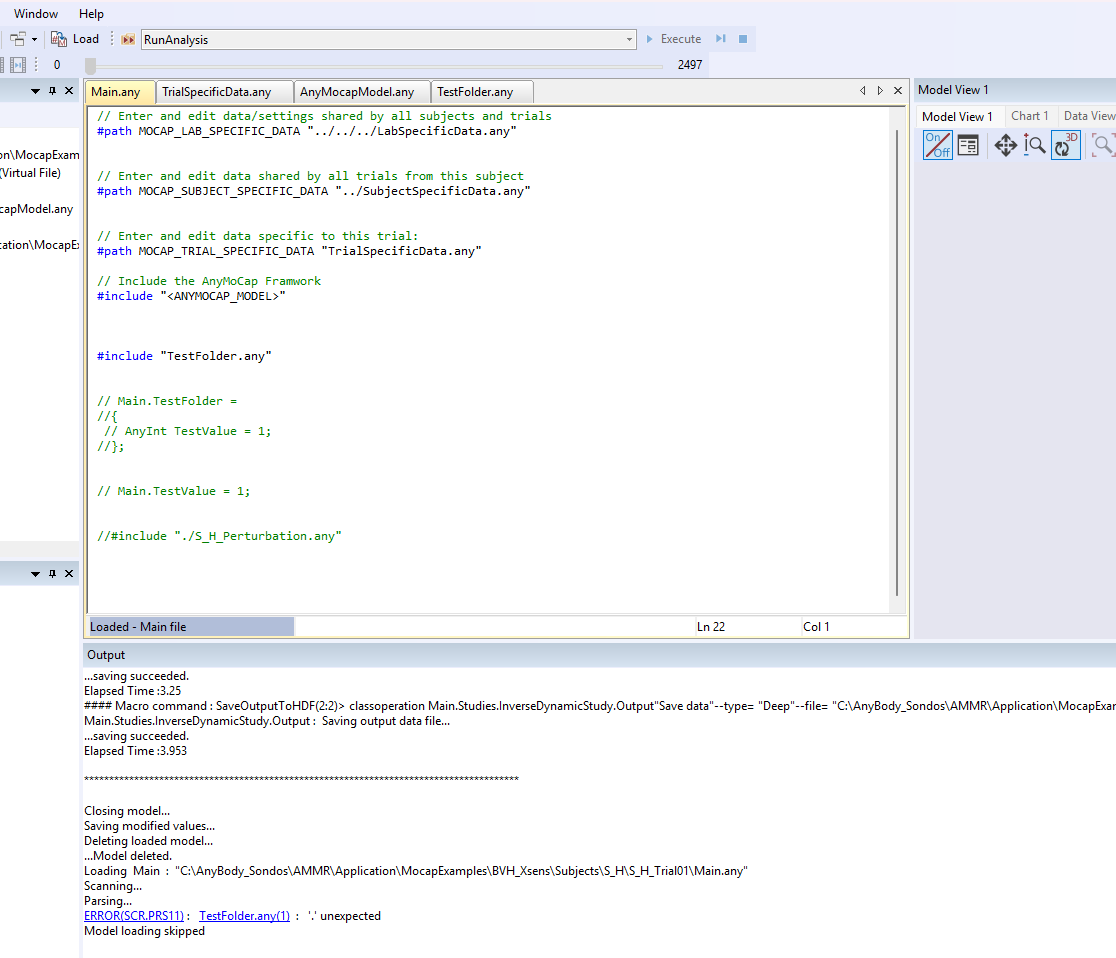
Then I added this line to Main.any (after the AnyMoCap model include):

#include "TestFolder.any"

This immediately causes parsing errors when loading the model.

Typical errors I see:

  • ERROR(SCR.PRS11): '{' unexpected
  • ERROR(SCR.PRS11): '.' unexpected
  • ERROR(SCR.PRS12): 'AnyFolder' when 'Main' was expected

These errors occur before any analysis runs.

Observations:

  • The model works as long as I only edit existing files pulled in via #path (SubjectSpecificData.any, TrialSpecificData.any).
  • Any attempt to include a new .any file causes parsing errors, even with very simple content.
  • I have tried different file names, moving the include line, and simplifying the code further, but the result is always the same.
  • This makes me suspect there are specific constraints on how the BVH_Xsens / AnyMoCap example is intended to be extended.

My question:

What is the correct and supported way to add custom AnyScript code to the AnyMoCap BVH_Xsens example?

Is it expected that users should only modify SubjectSpecificData.any and TrialSpecificData.any?
If it is possible to include new files, what scope or structure should the included file have?

I am not trying to apply external forces yet; I am only trying to understand why any new code added via a separate .any file fails to parse.

Thank you very much for your help.

Hello Sondos,

Welcome to the AnyScript Forum! Firstly, can I please ask you to update your affiliation in the user profile to write your organization name?

I am not sure why you are seeing the AMMR files as read only. Are you working in the installation directory? Have you copied the files yourself from the installation directory? The AMMR files in the installation directory are marked as read-only to prevent accidental changes. Please see this page and its subpages to understand how to work with AMMR.

Regarding the error you are seeing, please update the code to

Main = {
  AnyFolder TestFolder = {
    AnyIntVar TestValue = 1;
  };
};

You are outside the scope of Main at the place where you typed your code. Therefore, you must open the scope of Main, and then inside Main, you can use the full statements like Main.TestFolder. Also, you have to define TestFolder somewhere in your model using the AnyFolder class. Main.TestFolder looks for an object called TestFolder, and you will get an unresolved object error, if you haven't defined it correctly.

I strongly recommend you spend some time going through the tutorials before you start working on your own models.

Best regards,
Dave

Hi Dave,

Thank you for the explanation, and apologies for the confusion earlier.

You are correct — I was initially working inside the AMMR installation directory. I have since copied the BVH_Xsens example to a separate working directory and am only modifying files in my local copy.

I understand the scoping point you raised and that code such as

Main = {
  AnyFolder TestFolder = {
    AnyIntVar TestValue = 1;
  };
};

is required when opening the Main scope explicitly. My difficulty is that, within the BVH_Xsens / AnyMoCap workflow, I am trying to extend an existing branch of the model (specifically Main.EnvironmentModel) without redefining Main or interfering with objects that are already created by the framework.

To clarify the actual use case motivating this question:

My end goal is to add a brief external perturbation force to the trunk during inverse dynamics, applied at or near the trunk’s center of mass. The perturbation is intended to be:

  • defined as a percentage of body weight (e.g., 10–15% BW),

  • applied only for a short time window (impulse-like),

  • and used to study balance/instability responses rather than to drive the motion.

Conceptually, this would be implemented using an AnyForce3D attached to a trunk-fixed reference frame and time-gated using the study time. However, before implementing the force itself, I wanted to confirm where such user-defined objects are intended to be added in the AnyMoCap/BVH_Xsens structure.

So my main questions are:

  1. What is the supported way to add custom AnyScript objects (e.g., external forces, additional reference frames) to the BVH_Xsens / AnyMoCap example?

  2. Is there a recommended hook file or include location under EnvironmentModel for user extensions?

  3. Or is the intended workflow that users should only modify SubjectSpecificData.any and TrialSpecificData.any, and not include new .any files?

At the moment, including a new .any file that defines even simple objects under EnvironmentModel leads to parsing/scope issues unless I explicitly redefine Main, which I suspect is not the intended pattern for this example.

Thank you very much for your guidance — I want to make sure I am extending the AnyMoCap framework in a way that is consistent with its design.

Best regards,
Sondos

Hi Sondos,

This can be done in several ways.

A1: I think it would be most natural to go to the LabSpecific file and add code like this

Main ={

EnvironmentModel ={#include “MyImpulseForce.any; };

};

But the same lines could also have been added TrialSpecific or SubjectSpecific files.

When you add your code inside EnviromentModel this will ensure that InverseDynamicStudy will pick it up and add it to the study, since EnvironmentModel is already used by the Study.

If instead you would have written

Main ={

AnyFolder MyOwnEnvironmentModel ={#include “MyImpulseForce.any; };

};

The predefined studies in the mocap would not know that this folder should be include, so that would have had to be done manually (also possible)

A2: So I would recommend to make your own file with this content.

A3: That would also be possible but better to do as described above.

It is perfectly ok to open Main and add things, this is normal practice and provides a lot of freedom.

Some comments on the force you will add:

  • Note that the force will not change the motion only the force, i think you are already aware of this.
  • If you have multiple trials you likely would want to add the forces at different time instances, these time instances I would add inside the trial specific data and then have the AnyForce3D to use.
  • Typically if you want a force to be an impluse you would first define a function of time that represents the force impluse, and then use this function in the AnyForce3D to apply the force.
    • ForceFunction def: use e.g. AnyFunInterpol or AnyFunSquareWave for this.
    • Applying the force write something like this
    • AnyForce3D MyForce = {
      F=MyForceFunction(Main.Studies.InverseDynamicStudy.t);
    • };

Hope it helps

Best regards

Søren

Hi Søren,

Thank you again for your earlier explanation about extending Main.EnvironmentModel. That helped clarify the correct direction.

I am trying to implement a brief perturbation force in the BVH_Xsens / AnyMoCap model to simulate a forward push applied to the trunk or pelvis during InverseDynamicStudy. The goal is to model a short impulse force that would mimic a trip perturbation in a balance-recovery scenario.

Following your suggestion, I attempted to add the force inside EnvironmentModel through a separate include file.

I created a file called MyImpulseForce.any with a very simple test structure:

AnyFolder Perturbation = {

  AnyFunSquareWave ForceProfile = {
    Amp = 0.15 * Main.Model.BodyModel.BodyParameters.BodyMass * 9.81;
    T = 0.12;
    t0 = 0.5;
  };

  AnyForce3D TripForce = {
    AnyRefFrame &Pelvis = Main.HumanModel.BodyModel.Trunk.SegmentsLumbar.PelvisSeg;

    F = {ForceProfile(Main.Studies.InverseDynamicStudy.t), 0, 0};
  };

};

Then I attempted to include it under EnvironmentModel using:

Main = {
  EnvironmentModel = {
    #include "MyImpulseForce.any"
  };
};

However the issue is when compiling, I receive parser errors such as:

'.' unexpected
'{' unexpected
'AnyFolder' when 'Main' was expected

The model runs normally if I only edit SubjectSpecificData.any, so I suspect I may still be misunderstanding where or how this include should be placed within the mocap framework.

Before continuing further, I wanted to make sure I am structuring this correctly:

  1. Is extending Main.EnvironmentModel with a custom external force like this the correct approach in the BVH_Xsens model?

  2. Should the AnyForce3D reference an existing trunk or pelvis segment directly, or is it better practice to define a new AnyRefNode attached to the segment and apply the force there?

  3. Is there a preferred hook file in the AnyMoCap framework (for example LabSpecific.any vs TrialSpecificData.any) for adding external perturbation forces?

Also, if there is a recommended segment or reference node commonly used for trunk perturbations in the BVH_Xsens model, I would appreciate any suggestions.

Thank you very much for your help.

Best regards,

Sondos

Hi Sondos,

Here are some answers,

I have modified the force code a bit to look like this

AnyFolder Perturbation = {
   
    AnyFunSquareWave ForceProfile = 
    {
      InitialValues = {0.0};
      Ts = {1.0,3.0};  //time value for the change
      Values = {{1.0,0.0}}; 
      dT = {0.4,0.5};  //transition time
    };

  
  AnyForce3D TripForce = {
    AnyRefFrame &Pelvis = Main.HumanModel.BodyModel.Trunk.SegmentsLumbar.PelvisSeg;

    F = {.ForceProfile(Main.Studies.InverseDynamicStudy.t)[0], 0, 0};
  };

};


Note that the line you have “Amp…” is no longer there, since this object “AnyFunSquareWave” does not have an “Amp” object. Please see the reference manual and the small example code there related to this object it will help you understand how to use this function. In the code above there will be a force 0 initially then at t=1sec it will be 1 and go down to zero at t=3s.

Note also the “.” in front of ForceProfile in this line, the “.” takes it one folder out and makes it possible to find the function.

F = {.ForceProfile(Main.Studies.InverseDynamicStudy.t)[0], 0, 0};

Concerning where to include the file i would do it in the top of the LabSpecific.any file, then all your models will automatically have this.

Main ={
  EnvironmentModel ={
    #include "MyimpluseForce.any"
  };
};

Concerning where to apply the force it could be ok to use Thorax or Pelvis i thin.

As i wrote i would do it in the LabSpecific.any file it is used to define settings like forces, gravity etc.. so it naturally belongs there.

Best regards

Søren

Hello Søren,

Thank you again for your previous help — I was able to successfully implement and validate a pelvis-local perturbation force within the EnvironmentModel, and it is now working correctly in the InverseDynamicStudy.

I am now trying to extend this toward my research goal, which is to study how an imposed delay in the recovery motion could affect mechanical recovery feasibility.

Currently, I understand that:

  • The AnyMoCap BVH_Xsens model uses implicit AnyKinDriver definitions
  • Joint kinematics are driven by InterpolatedData evaluated at the study time t
  • External forces, such as my perturbation, do not change the prescribed motion; they only change the required forces/moments

My question is about representing a delayed recovery response:

I would like to investigate a delay between the perturbation at time t0 and the start of the recovery motion.

From inspecting the model structure, it seems that:

  • There is no direct way to evaluate the BVH kinematics at a modified time, e.g., t_motion = t - delay
  • The drivers do not expose a simple way to override the evaluation time

So I would like to ask:

  1. What is the recommended approach in AnyBody for representing a time delay in the kinematic response after a perturbation?
  2. Is restructuring the drivers, for example replacing implicit AnyKinDriver definitions with explicit drivers using something like DriverPos = InterpolatedData(t_motion), a correct approach?
  3. Or would it be better to preprocess the BVH data externally, for example by time-shifting the recovery segment?
  4. Are there any examples or recommended practices for this type of modification?

My main concerns are:

  • maintaining physically realistic motion
  • avoiding solver instability
  • staying consistent with the AnyMoCap pipeline design

Any guidance on the most robust and recommended approach would be greatly appreciated.

Thank you again for your help.

Hi Sondos,

I am not sure I fully understand what it is you are trying to achieve sorry :wink:

Here are my understanding:

  • The motion is recorded with Xsens.
  • You want to simulate applying a force impulse to the motion

I am in doubt which of the following two scenarios we are in:

  • ScenarioA: force impulse was added while recording motion:
    • The force impulse was it part of motion recording? so is the motion already is influenced by the applied force?
    • If so then I think it is just a matter of applying the same force as in the experiment at the correct instance of time in the motion, so in this case no need to manipulate the motion “time”
  • ScenarioB: force impulse was not added while doing motion recording
    • This is more tricky, you can add the force but the motion will not change
    • You can change the recorded motion to some extend but you need to know how it should be changed, this is not clear to me. Please describe how the motion should be in this case. From your description I get the impression that you would like to “pause” the motion for short period then move on is this correct?

Here are some answers to your questions:

Q1:What is the recommended approach in AnyBody for representing a time delay in the kinematic response after a perturbation?

A1: So if this means you would like to Pause the motion for a while, it can be done be editing the tArray of the study, this is an array of the time values you are running with and in principle it can be changed to have non-constant time increments. If this is what you aim for look at the functions farr, arrcat to create a new tArray. Note that this motion may not be in balance!

Q2: Is restructuring the drivers, for example replacing implicit AnyKinDriver definitions with explicit drivers using something like DriverPos = InterpolatedData(t_motion), a correct approach?

A2: No i think the method outlined in A1 is better

Q3: Or would it be better to preprocess the BVH data externally, for example by time-shifting the recovery segment?

A3: If you have a way to do this externally then this is possibly easier…

Q4: Are there any examples or recommended practices for this type of modification?

A4: No i am sorry, i do not have such an example.

Best regards

Søren

Hello Søren,

Thank you very much for the clarification — this is extremely helpful.

You are correct that I am working in Scenario B at the moment:

  • the walking motion was recorded without a real perturbation

  • the external pelvis force is currently applied only inside the inverse-dynamics simulation

  • therefore the prescribed motion itself does not change automatically

My long-term research goal is not to “pause” the motion arbitrarily, but rather to approximate the effect of a delayed corrective response after a perturbation.

Conceptually, I am trying to investigate something like:

  • perturbation occurs at time t0t_0t0​

  • the body continues following the original motion for a short delay Δt\Delta tΔt

  • after this delay, the recovery motion begins

So the idea is to create a delayed recovery trajectory and then evaluate how the required muscle activity changes under inverse dynamics.

From your response, it sounds like modifying the motion externally (for example preprocessing the BVH data or modifying the study tArray) would likely be more appropriate than restructuring the AnyKinDrivers themselves.

At this stage, I mainly want to ensure that the approach is biomechanically reasonable within the limitations of inverse dynamics, rather than trying to create a fully predictive forward-dynamics fall simulation.

One follow-up question:

If I were to preprocess the BVH externally, would you generally recommend:

  • modifying the joint-angle trajectories directly, or

  • modifying the study tArray / time progression while keeping the original BVH data unchanged?

I am mainly concerned with maintaining smooth/physically realistic kinematics and avoiding introducing discontinuities into the inverse-dynamics solution.

Thank you again for your help and guidance.

Best regards,
Sondos