I am using AnyBody v8.1 for an inverse dynamics study on back exoskeletons. I am running a counterfactual simulation using MoCap data recorded while the subject was wearing the exoskeleton. I am comparing two conditions on the exact same motion kinematics:
Exo Condition: Assistive torque applied.
No-Exo Condition: Assistive torque set to zero (simulating no-exoskeleton)
The problem I am facing is, in specific frames (particularly at the start of flexion), the "Exoskeleton Condition" yields significantly higher L5/S1 compression than the No-Exo condition. Theoretically, the assistive torque should reduce the load, but here it seems to increase it. I would want to know -
Has anyone else experienced this result where adding assistance increases the joint load in specific phases?
What are the likely causes for this in the AnyBody solver?
Are these transient spikes considered acceptable, or does this indicate any modeling error that needs to be changed? Thank you so much!
I am not too surprised to read that a back exoskeleton results in higher loads at the start of trunk flexion. If I suppose it's a passive exoskeleton, it seems normal that the user has to overcome the resistance in the flexion phase to receive support in the extension phase. But I would also expect to see a consistently higher load in the flexion phase.
You mentioned, you see spikes in a few frames. I wonder if it is caused by the MoCap data. Do you see some artefacts/spikes in the L5/S1 compression force at the same frames in the No-Exo condition? I also wonder if it's the assistive torque and the human-exoskeleton interface. How have you modelled the exoskeleton? Can you please share some details about how have you calculated and applied the assistive torque?
It's good to know you have identified the problem. You could try to play around with the filter settings in LabSpecificData.any/C3DSettings.any. You could consider lowering the marker filter cut off frequencies, but the default values are already on the lower side. There is a risk that you lose information if the movement is too fast for the cut off frequencies.
Another option is to go back to the mocap system and see if you selectively fix those few frames before exporting to c3d/bvh.
Thanks for the suggestions regarding the filter settings.
I looked into the filters and raw data as you advised. While it helped smooth out some noise, the core issue persists, which led me to re-examine my model definition as you asked.
To clarify my setup, I am modeling the assistance as a pure torque (AnyForce) applied directly to the segment, rather than using physical contact elements or reaction forces (related code block attached).
Given this setup (pure assistive moment + no negative forces due to physical contact type), I would theoretically expect the "Exo" conditions to show a consistently lower spinal load than the "No-Exo" condition.
However, while the No-Exo load is generally higher, there are still multiple crossover points where the assistance fails to reduce the load, even with the artifacts removed + filtering.
Do you have any insights on why a pure assistive moment might fail to reduce the net joint reaction force in these specific kinematic phases? Thank you so much, I really appreciate it!
It's hard to say for sure what could be wrong. You are seeing issues at multiple points, and you noted that filtering helped smooth out some noise. I also see that you are applying the assistive torque directly to the pelvis-thorax extension measure. I think there can still be a few problems:
You are reading in the torque profile from a file. There can be issues related to synchronization. You are reading the torque profile as a function of iStep and this can be a risky thing to do because the mocap model crops the trial by a few frames at the beginning and the end of the inverse dynamics analysis. You could therefore be slightly out of sync. Ideally, you should read the torque profile as a function of time to be completely sure about synchronization (your force data file should also be setup accordingly).
You might still be seeing issues related to bad mocap data. If there is noise in the data, it means that the body is subject to unusual acceleration. For example, this can quite simply mean that even when you are doing a simple motion like trunk extension, you could be braking and accelerating in that simple motion instead of doing it in a smooth manner. The braking could require trunk flexors to be activated, and these could be loaded even more due to the presence of assistive torque, which normally helps trunk extensors.
Does that make some sense? Can you investigate the analysis a little bit more? For example, try to find out which muscles are loaded when you see these crossover points, and are these muscles supposed to be supported by the assistive torque profile?
Apologies for the delay in getting back to you. I checked the synchronization and ensured the torque profile is properly in sync with the kinematics.
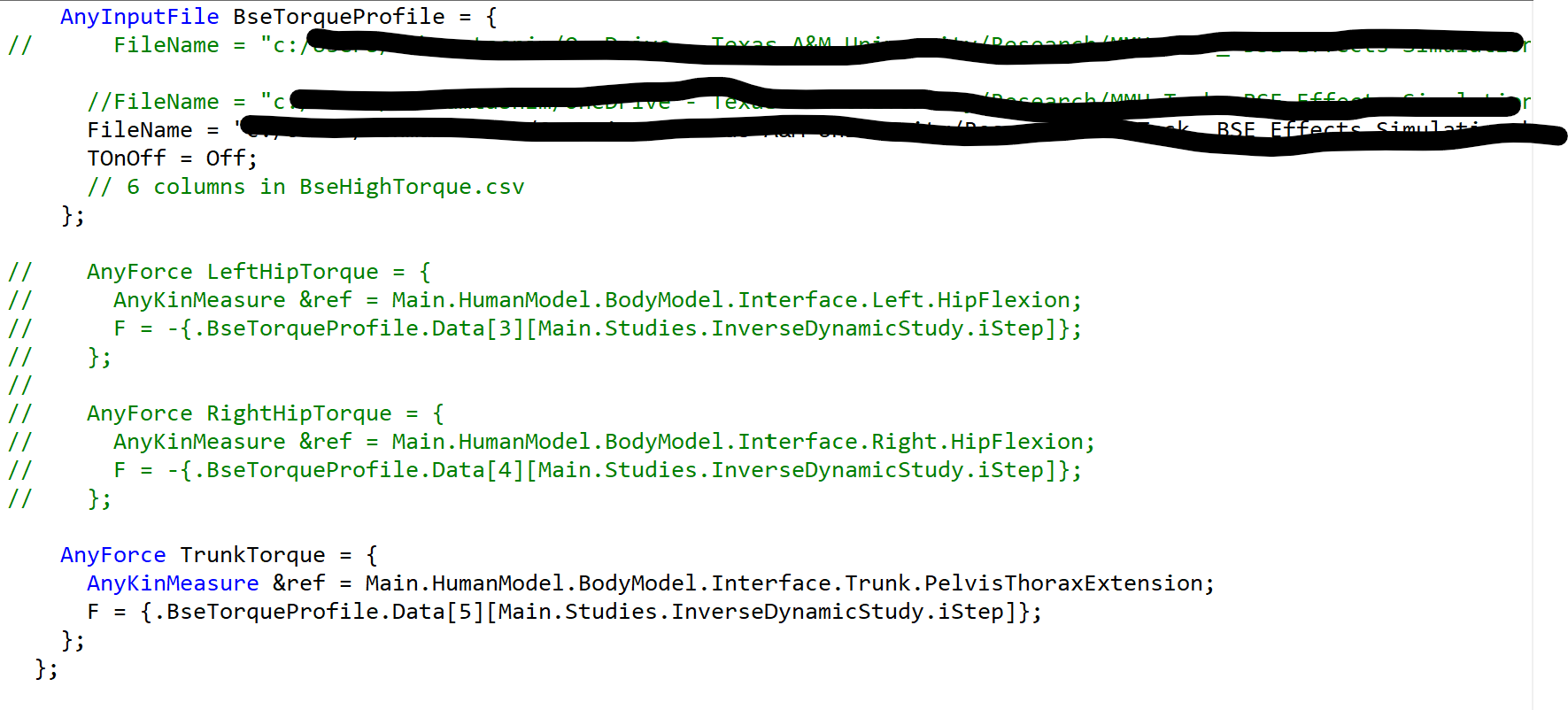
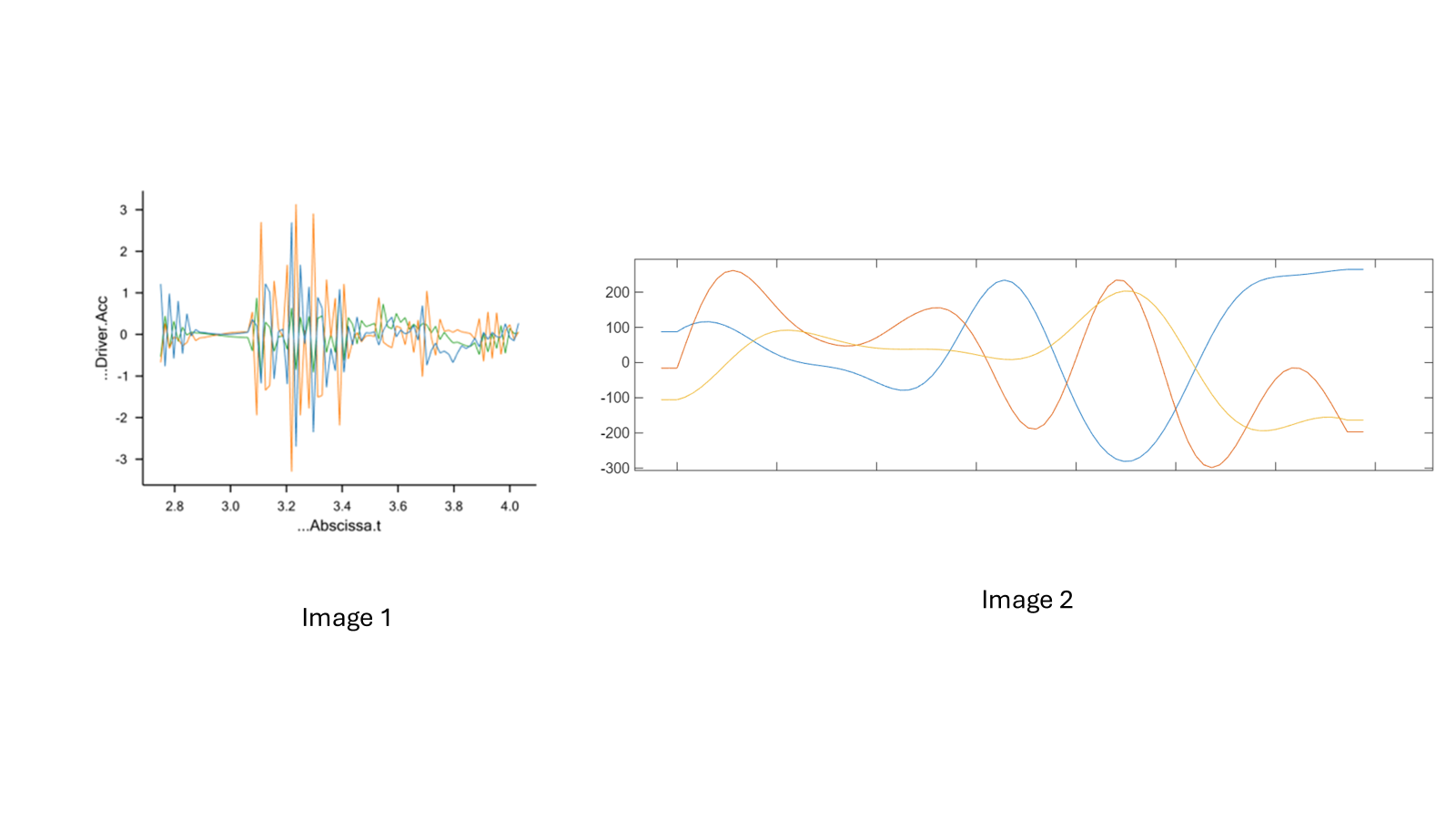
You were right that the body is subjected to unusual accelerations. We checked the marker driver accelerations in the model, and they are rapidly oscillating (Image 1). However, when we calculated the acceleration of the same MoCap data directly in MATLAB, the curves did not show this oscillation at all (Image 2).
Because of this, the high-frequency oscillation appears to be generated internally by AnyBody's kinematic solver. I already tried tweaking AnyBody's internal kinematic low-pass filters to smooth this out, but it didn't resolve the issue.
Do you have recommendations on what would be the best approach to fix this?
Can you please describe exactly the second image that you have generated in MATLAB? What exactly are you plotting? And what are labels/units on the axes? In the AnyBody graph, the values are between -3 and 3, whereas the MATLAB graph shows values between -300 and a little over 200. That is a factor of 100, which I imagine is just the units (AnyBody is in m/s^2, and I suppose MATLAB is in cm/s^2?).
I am also wondering about the horizontal axes... The three series in the AnyBody graph are all close to zero at the end of the trial, but in the MATLAB graph, two of them are -200, and one of them is over +200. If it is acceleration, I would expect the values to be close to zero, if the subject was relatively still towards the end of the trial.
Lastly, are you sure there is no filtering of data, in the processing of MATLAB?
Thanks for your follow-up! To clarify, the MATLAB plot shows the RASI marker acceleration, computed over the same frame range using a 5-point finite-difference second derivative of the marker trajectory. The time axis is in seconds in both the plots.
The marker positions in the C3D are stored in cm, and the MATLAB acceleration is indeed in cm/s². For the C3D data used in AnyBody, the marker trajectories are preprocessed before export. I applied a 4th-order Butterworth low-pass filter at 3 Hz to the C3D data in both cases - this was done as a test to strongly smooth the trajectories. In both cases, the position signals themselves appear smooth and similar. The subjects started the next trial almost immediately, so they were not completely still.
Despite this similar preprocessing, the marker-driver acceleration in AnyBody shows rapid oscillations, but the MATLAB-derived acceleration of the marker over the same time window appears smooth.
I am not sure whether these two signals are expected to match directly, or whether the kinematic constraint enforcement in AnyBody can introduce this type of high-frequency behavior in the marker-driver acceleration. Looking forward to your recommendations!
I think there are a few things that we need look at. Let's start with position. Marker Driver.Pos gives the error between marker trajectory and the model marker, and it is not the same as the marker trajectory itself. Driver.Pos should normally be hovering around 0. I am a little bit confused when you say you see similar position signals, what exactly are you looking at in AnyBody?
I think you should not look at marker Driver.Vel and Acc. You should instead find the folder Linear in the Driver folder and look at TrajectoryPos, Vel and Acc. You can see their description in the reference manual. These should be comparable to what you are trying to plot in MATLAB.
Then, I would like you to check: Main.ModelSetup.LabSpecificData.LowPassFilterSettings.MarkerFilterCutOffFrequency
Try to change the values here and see if it is affecting the acceleration plot.