I am quite new to anybody and I want to try out to a simulation of my own movement for the ammr leg press. I had access to a accelerometer which I used to get the angle between thigh and shank at every point in time. I put my data in a text file but I am struggling on where to write the code that uses my file. All help is wanted
Hi Patrik,
The model is actually almost prepared for exactly this.
I you open the file TrialSpecificData you will find these lines:
AnyVector TimeVector = (tEnd-tStart)*{-0.1, 0, 0.1, 0.3, 0.5, 0.7, 0.9, 1.0, 1.1}
                        + tStart*{1, 1, 1, 1, 1, 1, 1, 1, 1};
  AnyVector KneeFlexionAngleVector = {50, 50, 50, 5, 5, 5, 50, 50, 50};
One solution would be type in your data here.
Another solution is to have data in a txt file and read it into the driver directly this would be done in the JointsAndDrivers.any file.
This code
 //Knee driver
  AnyKinEqInterPolDriver KneeDriverRight =
  {
      AnyKinMeasureOrg  &Knee = ...BodyModel.Interface.Right.KneeFlexion;
      Type = Bspline;
      T = Main.Parameters.TrialSpecificData.TimeVector;
      Data = pi/180*{Main.Parameters.TrialSpecificData.KneeFlexionAngleVector};
      Reaction.Type = {Off};
  };
Would change to something like this
 //Knee driver
  AnyKinEqInterPolDriver KneeDriverRight =
  {
      AnyKinMeasureOrg  &Knee = ...BodyModel.Interface.Right.KneeFlexion;
      Type = Bspline;
     FileName ="YOUR_OWN_DATA.txt"
      Reaction.Type = {Off};
  };
Hope it helps
Best regards
Søren
1 Like
Thank you for your reply.
I am now facing the problem that the knee is beeing pushed through the chest at the start of the simulation. My first values in the text file is about 1.9 radians. Am I using the wrong angle as the input or is my model not adjusted for the leg press I was using?
Hi
A knee angle of about 110 deg is possible too high for the angle of the thorax, as you can see above the example model started with 50 deg.
Best regards
Søren
I have an idea that it might be because of the fixed node that connects the feet to the foot rest. When I am looking at the simulation it feels like my feet were further down. Can lowering the node fix the issue and if so where can I edit it?
Hi Patrik,
I do not think it is related to foot nodes connection, they are connected with AnyStdJoints see the JointsAndDrivers.any file
 AnyStdJoint Left_Foot_Fix_Joint =
  {
    AnyRefFrame& base = Main.Model.EnvironmentModel.Segs.Foot_Rest.left_toe_node;
    AnyRefFrame& target = Main.Model.HumanRefNodes.LeftFoot.ToeNode;
    Constraints.Reaction.Type = {Off, Off, Off, Off, Off, Off};
  };

  AnyStdJoint Right_Foot_Fix_Joint  =
  {
    AnyRefFrame& base = Main.Model.EnvironmentModel.Segs.Foot_Rest.right_toe_node;
    AnyRefFrame& target = Main.Model.HumanRefNodes.RightFoot.ToeNode;
    Constraints.Reaction.Type = {Off, Off, Off, Off, Off, Off};
  };
Please display a picture of the model it would help me understand the problem.
I tried to alter the original model and mulitplied the joint angles by 2, in the TrialSpecific.any file
AnyVector KneeFlexionAngleVector = 2*{50, 50, 50, 5, 5, 5, 50, 50, 50};
This gives this image.
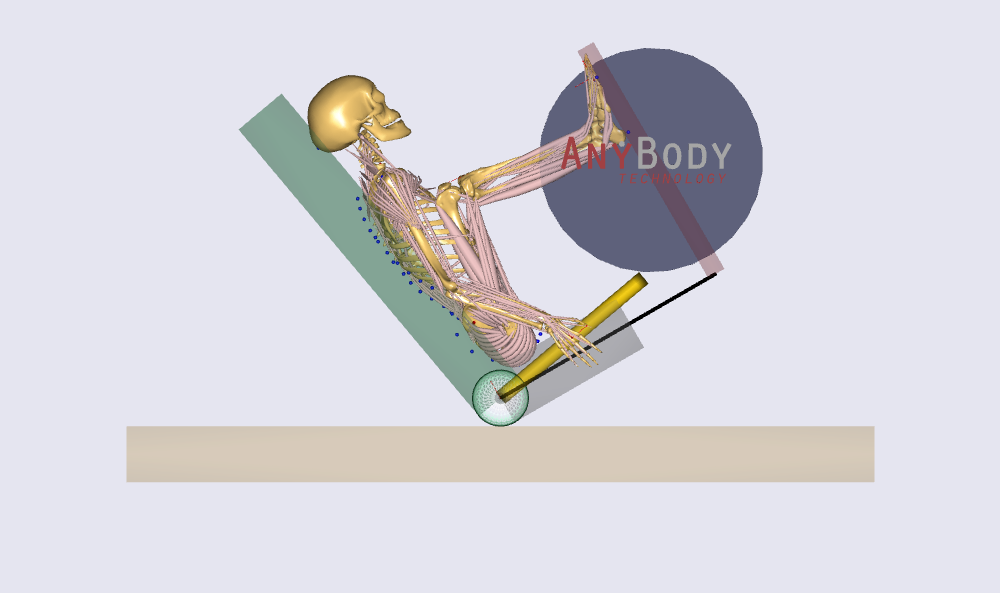
A knee angle of 100 deg or more is too big for the upper body angle. This can be adjusted in the file "InputParameters.any" by this line
AnyVar Back_Rest_Tilt_Angle = 130; // 90~180 deg
Best regards
Søren
This topic was automatically closed 125 days after the last reply. New replies are no longer allowed.